
Taking Orders on WhatsApp and Instagram? How to Turn DM Chaos Into a Proper Online Store
Taking Orders on WhatsApp and Instagram? How to Turn DM Chaos Into a Proper Online Store

Darin Mujeeb
Darin Mujeeb
E-Commerce Growth
E-Commerce Growth
•
If your "store" is currently a WhatsApp chat list, a camera roll full of payment screenshots and a notebook that only you can read, this one's for you.
The DM Store Problem
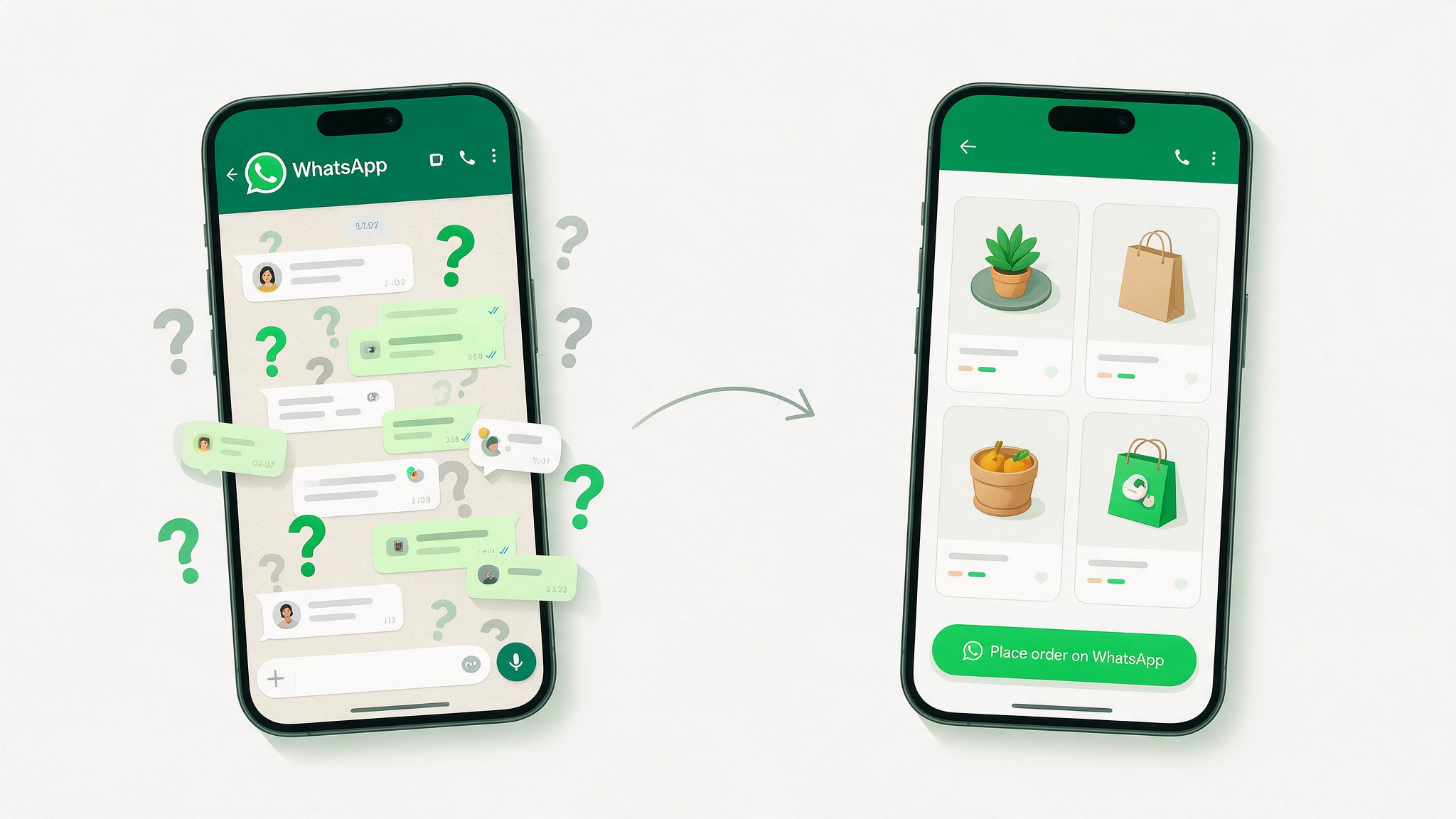
Almost every small seller we talk to in the community started the same way. You post a product on Instagram or share it on your WhatsApp status, someone replies "price?", and you're in business.
It works, and it's how a huge number of Indian brands got their first hundred customers. But somewhere between order 20 and order 200, the same things start breaking:
You answer "price?", "size available?" and "COD undo?" forty times a day, one chat at a time.
Your catalog lives in old posts and forwarded photos, so customers ask about products you sold out of weeks ago.
Orders are spread across WhatsApp, Instagram DMs and the occasional phone call. At night you try to piece them together in a notebook or spreadsheet.
A customer says "I paid yesterday", and you scroll through 300 screenshots trying to find it.
You can't take a day off, because the "checkout" is you.
None of this means DM selling is wrong. It means you've outgrown doing all of it by hand.
💡 Key Insight: Customers don't mind ordering on WhatsApp. What slows everyone down is the back-and-forth before the order: price checks, size questions, stock confirmations. Remove that, and WhatsApp selling scales much further than you'd expect.
Why WhatsApp Selling Works, and Where It Breaks
WhatsApp and Instagram work for small sellers because they're personal. The customer is talking to a real person, they can ask questions, and trust builds quickly. That's worth keeping.
What doesn't scale is using a chat window as your catalog, cart, order form and order book all at once. A chat is great for the conversation and bad at holding structured information: which product, which size, how many, what address, paid or not.
So the goal here isn't to move customers off WhatsApp. It's to put a simple storefront in front of it, so that by the time a customer messages you, they've already chosen what they want.
The Fix: Keep WhatsApp, Add a Storefront in Front of It
This is where Store.link fits well. We covered the basics last month: your product catalog lives in a Google Sheet, and every row becomes a product on a live, mobile-friendly store.
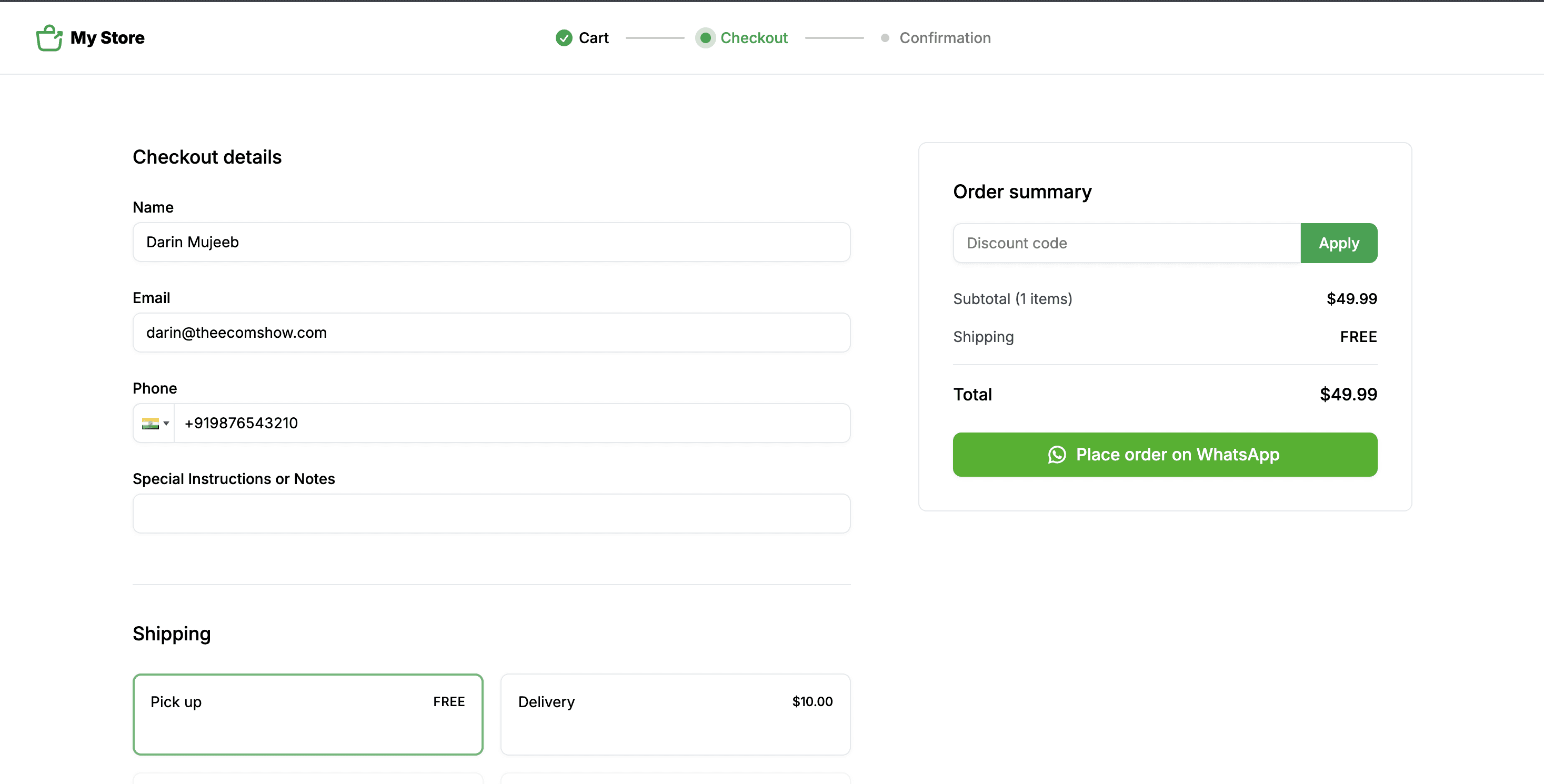
For DM sellers, the feature that matters most is WhatsApp ordering. Once you switch it on, the checkout button on your store becomes "Place order on WhatsApp." Customers browse your full catalog, add items to the cart, and then send you a complete order on WhatsApp, with products and quantities already filled in.
You still get the WhatsApp conversation. It just starts with "here's my order" instead of "price?"
Setting It Up: From DMs to a Store Link in an Afternoon
1. Create your store. Sign up on Store.link, click Create New Store, choose a store name and currency, and pick your product type. Most DM sellers will choose Physical products; home bakers or salons taking bookings can choose Services. (Our previous guide walks through each onboarding screen.)
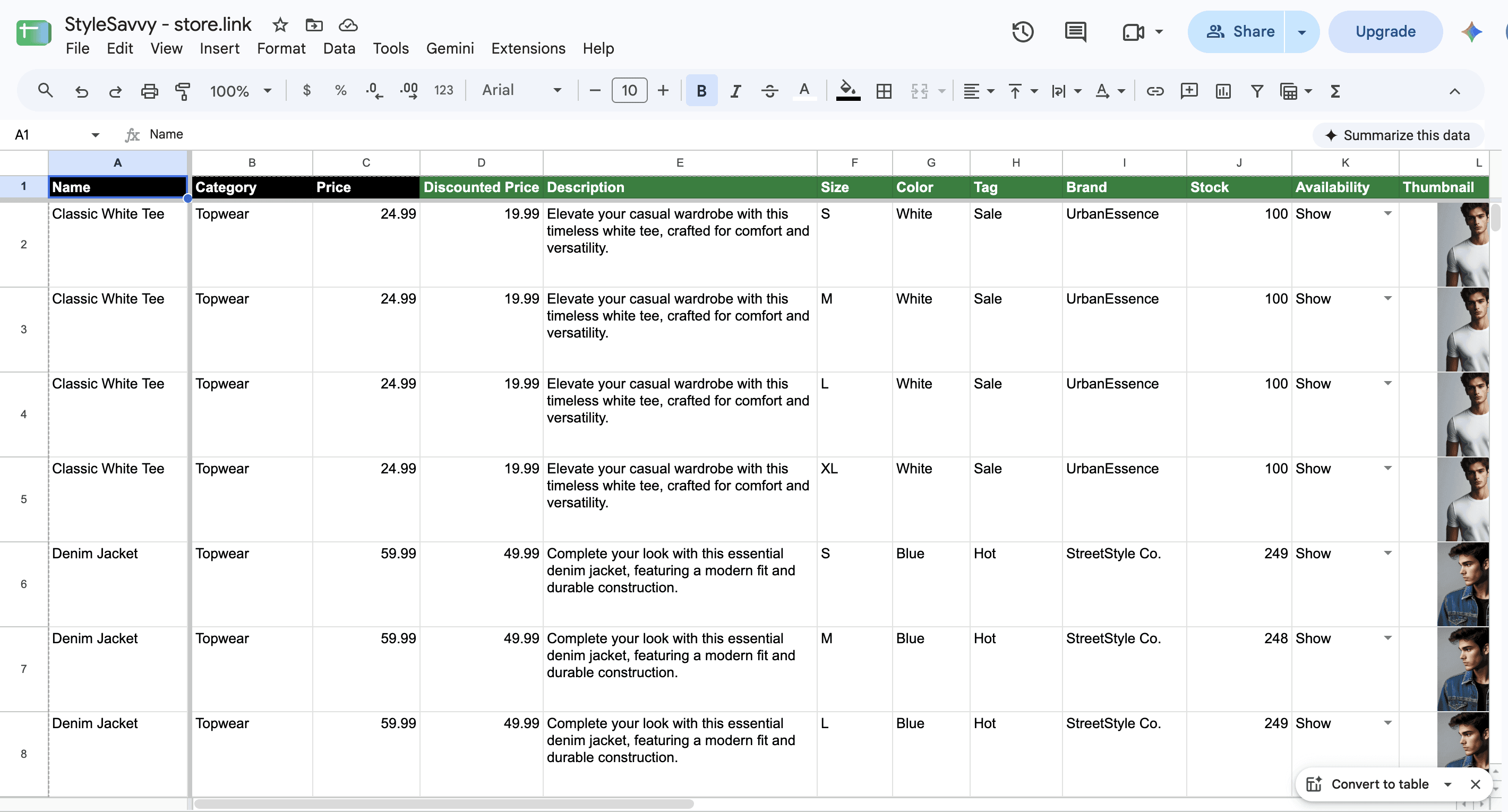
2. Move your catalog out of your camera roll and into the sheet. Open your Product Sheet and add one row per product: name, category, price, description, sizes or colours, and stock. For images, upload photos from your phone in the Gallery tab and paste them into the sheet, or paste public Google Drive links. This is the most time-consuming step, so start with your 10 to 20 best sellers and add the rest later.
3. Turn on WhatsApp ordering. Go to Settings > Orders and switch on Get order on WhatsApp. Your checkout button now says "Place order on WhatsApp," and every order reaches you as a structured message.

4. Decide how you'll collect payment. If you prefer confirming payment on WhatsApp (UPI, COD, whatever your customers are used to), you can keep doing that. If you want prepaid orders without chasing screenshots, connect Razorpay under Settings. It's the natural default for Indian sellers, and Stripe, PayPal and Square are there if you sell abroad.
5. Switch on order tracking. Under Settings > Orders > Order tracking, turn on tracking so customers get a "Track your order" link on the confirmation page and in their confirmation email. That's one less "bro, where's my parcel?" message per order.
6. Put your store link everywhere your customers already are.
Your Instagram bio, replacing the "DM to order" line.
Your WhatsApp Business profile and catalog description.
A pinned Instagram story highlight called "Shop" or "Order here."
A WhatsApp Business quick reply, so when someone asks "price?", one tap sends them the full catalog.
Your broadcast lists whenever you restock or drop something new.
What About the Orders That Still Come in Through DMs?
Some customers will always message you directly, especially regulars and older buyers. That's fine.
When an order arrives in a DM, add it manually: go to Orders and click +Create Order, then add the products, apply a discount if needed, pick a shipping method and enter the customer's details. That order goes into your Order Sheet alongside the orders from the store.
This matters more than it sounds. For the first time, every order you take, wherever it came from, is in one place. You can see what's selling, what's pending and who hasn't paid without scrolling through chats.
Before and After
Before: product photos in your gallery, prices in your head, stock updates by memory, orders spread across three apps, and a notebook you reconcile at midnight.
After: one link with your whole catalog, prices and stock you update in a spreadsheet, orders arriving on WhatsApp already filled in, DM orders logged in the same place, and customers tracking their own parcels.
Your customers still chat with you. You just stop acting as the product catalog.
Who This Works For, and When You'll Outgrow It
This setup makes sense if you're:
Currently selling mostly through Instagram posts, reels or WhatsApp status
A home-based business (clothing, jewellery, bakes, handmade products) whose customers prefer chatting before buying
A seller whose regulars order again and again and just need to see what's new
Doing roughly 5 to 100 orders a month and losing time to repetitive questions
You'll probably want a heavier setup if you're:
Running paid ads at scale and need detailed pixel tracking and conversion data
Handling high order volumes with complex logistics, returns and warehouse workflows
Building a brand where a fully custom website experience is part of the product
Moving from DMs to a store.link is a small, cheap step that removes most of the chaos. You can decide on Shopify-level infrastructure later, once the orders justify it.
Frequently Asked Questions
Can my customers still order on WhatsApp?
Yes. With WhatsApp ordering switched on, customers browse the store and the order is sent to you on WhatsApp. You keep the conversation, minus the back-and-forth.
Do I need my own website or domain?
No. Your store gets a store.link URL you can drop into your Instagram bio straight away. You can connect a custom domain on a paid plan later.
Is it free?
Store.link has a free plan with zero commission on sales, so you can test the setup before paying for anything.
Can I accept Cash on Delivery?
You can keep collecting payment however you do today and confirm it on WhatsApp, or connect Razorpay for prepaid online payments.
What happens to orders that come in directly through Instagram DMs?
Add them manually from the Orders page so every order ends up in the same Order Sheet.
The eCom Mafia Take: Don't Kill the Conversation, Structure It
A lot of sellers think "going online properly" means leaving WhatsApp behind for a big website. For most small sellers in Kerala and the Gulf, the conversation is what makes customers trust you enough to buy.
So keep the chat. Just stop using it as your catalog, cart and order book. Put a store link in your bio, let customers show up knowing what they want, and spend your time on sourcing, content and service instead of answering "price?" for the fortieth time today.
If your DMs are busier than your delivery schedule, a store.link might be the easiest upgrade you make this year.
If your "store" is currently a WhatsApp chat list, a camera roll full of payment screenshots and a notebook that only you can read, this one's for you.
The DM Store Problem
Almost every small seller we talk to in the community started the same way. You post a product on Instagram or share it on your WhatsApp status, someone replies "price?", and you're in business.
It works, and it's how a huge number of Indian brands got their first hundred customers. But somewhere between order 20 and order 200, the same things start breaking:
You answer "price?", "size available?" and "COD undo?" forty times a day, one chat at a time.
Your catalog lives in old posts and forwarded photos, so customers ask about products you sold out of weeks ago.
Orders are spread across WhatsApp, Instagram DMs and the occasional phone call. At night you try to piece them together in a notebook or spreadsheet.
A customer says "I paid yesterday", and you scroll through 300 screenshots trying to find it.
You can't take a day off, because the "checkout" is you.
None of this means DM selling is wrong. It means you've outgrown doing all of it by hand.
💡 Key Insight: Customers don't mind ordering on WhatsApp. What slows everyone down is the back-and-forth before the order: price checks, size questions, stock confirmations. Remove that, and WhatsApp selling scales much further than you'd expect.
Why WhatsApp Selling Works, and Where It Breaks
WhatsApp and Instagram work for small sellers because they're personal. The customer is talking to a real person, they can ask questions, and trust builds quickly. That's worth keeping.
What doesn't scale is using a chat window as your catalog, cart, order form and order book all at once. A chat is great for the conversation and bad at holding structured information: which product, which size, how many, what address, paid or not.
So the goal here isn't to move customers off WhatsApp. It's to put a simple storefront in front of it, so that by the time a customer messages you, they've already chosen what they want.
The Fix: Keep WhatsApp, Add a Storefront in Front of It
This is where Store.link fits well. We covered the basics last month: your product catalog lives in a Google Sheet, and every row becomes a product on a live, mobile-friendly store.
For DM sellers, the feature that matters most is WhatsApp ordering. Once you switch it on, the checkout button on your store becomes "Place order on WhatsApp." Customers browse your full catalog, add items to the cart, and then send you a complete order on WhatsApp, with products and quantities already filled in.
You still get the WhatsApp conversation. It just starts with "here's my order" instead of "price?"
Setting It Up: From DMs to a Store Link in an Afternoon
1. Create your store. Sign up on Store.link, click Create New Store, choose a store name and currency, and pick your product type. Most DM sellers will choose Physical products; home bakers or salons taking bookings can choose Services. (Our previous guide walks through each onboarding screen.)
2. Move your catalog out of your camera roll and into the sheet. Open your Product Sheet and add one row per product: name, category, price, description, sizes or colours, and stock. For images, upload photos from your phone in the Gallery tab and paste them into the sheet, or paste public Google Drive links. This is the most time-consuming step, so start with your 10 to 20 best sellers and add the rest later.
3. Turn on WhatsApp ordering. Go to Settings > Orders and switch on Get order on WhatsApp. Your checkout button now says "Place order on WhatsApp," and every order reaches you as a structured message.
4. Decide how you'll collect payment. If you prefer confirming payment on WhatsApp (UPI, COD, whatever your customers are used to), you can keep doing that. If you want prepaid orders without chasing screenshots, connect Razorpay under Settings. It's the natural default for Indian sellers, and Stripe, PayPal and Square are there if you sell abroad.
5. Switch on order tracking. Under Settings > Orders > Order tracking, turn on tracking so customers get a "Track your order" link on the confirmation page and in their confirmation email. That's one less "bro, where's my parcel?" message per order.
6. Put your store link everywhere your customers already are.
Your Instagram bio, replacing the "DM to order" line.
Your WhatsApp Business profile and catalog description.
A pinned Instagram story highlight called "Shop" or "Order here."
A WhatsApp Business quick reply, so when someone asks "price?", one tap sends them the full catalog.
Your broadcast lists whenever you restock or drop something new.
What About the Orders That Still Come in Through DMs?
Some customers will always message you directly, especially regulars and older buyers. That's fine.
When an order arrives in a DM, add it manually: go to Orders and click +Create Order, then add the products, apply a discount if needed, pick a shipping method and enter the customer's details. That order goes into your Order Sheet alongside the orders from the store.
This matters more than it sounds. For the first time, every order you take, wherever it came from, is in one place. You can see what's selling, what's pending and who hasn't paid without scrolling through chats.
Before and After
Before: product photos in your gallery, prices in your head, stock updates by memory, orders spread across three apps, and a notebook you reconcile at midnight.
After: one link with your whole catalog, prices and stock you update in a spreadsheet, orders arriving on WhatsApp already filled in, DM orders logged in the same place, and customers tracking their own parcels.
Your customers still chat with you. You just stop acting as the product catalog.
Who This Works For, and When You'll Outgrow It
This setup makes sense if you're:
Currently selling mostly through Instagram posts, reels or WhatsApp status
A home-based business (clothing, jewellery, bakes, handmade products) whose customers prefer chatting before buying
A seller whose regulars order again and again and just need to see what's new
Doing roughly 5 to 100 orders a month and losing time to repetitive questions
You'll probably want a heavier setup if you're:
Running paid ads at scale and need detailed pixel tracking and conversion data
Handling high order volumes with complex logistics, returns and warehouse workflows
Building a brand where a fully custom website experience is part of the product
Moving from DMs to a store.link is a small, cheap step that removes most of the chaos. You can decide on Shopify-level infrastructure later, once the orders justify it.
Frequently Asked Questions
Can my customers still order on WhatsApp?
Yes. With WhatsApp ordering switched on, customers browse the store and the order is sent to you on WhatsApp. You keep the conversation, minus the back-and-forth.
Do I need my own website or domain?
No. Your store gets a store.link URL you can drop into your Instagram bio straight away. You can connect a custom domain on a paid plan later.
Is it free?
Store.link has a free plan with zero commission on sales, so you can test the setup before paying for anything.
Can I accept Cash on Delivery?
You can keep collecting payment however you do today and confirm it on WhatsApp, or connect Razorpay for prepaid online payments.
What happens to orders that come in directly through Instagram DMs?
Add them manually from the Orders page so every order ends up in the same Order Sheet.
The eCom Mafia Take: Don't Kill the Conversation, Structure It
A lot of sellers think "going online properly" means leaving WhatsApp behind for a big website. For most small sellers in Kerala and the Gulf, the conversation is what makes customers trust you enough to buy.
So keep the chat. Just stop using it as your catalog, cart and order book. Put a store link in your bio, let customers show up knowing what they want, and spend your time on sourcing, content and service instead of answering "price?" for the fortieth time today.
If your DMs are busier than your delivery schedule, a store.link might be the easiest upgrade you make this year.
More Blogs Like This
Taking Orders on WhatsApp and Instagram? How to Turn DM Chaos Into a Proper Online Store
E-Commerce Growth

Top Shipping Partners for E-commerce in UAE (Shopify)
E-Commerce Growth

Top E-commerce API Integration Solutions for Seamless Operations
E-Commerce Growth

5 Things to Solve 90% of Issues in E-Commerce
E-Commerce Growth




MORE LINKS
Copyright © 2026 The eCom Show™ is a brand of Golden Percentages LLP.
MORE LINKS
Copyright © 2026 The eCom Show™ is a brand of Golden Percentages LLP.
MORE LINKS
Copyright © 2026 The eCom Show™ is a brand of Golden Percentages LLP.